


Traveling to Colombia is easier when your mobile connection is ready before you land. Whether you are visiting Bogotá for business, exploring Medellín, working remotely from Cartagena, or traveling through the coffee region, a Colombia eSIM can give you mobile data without the need to buy and insert a physical SIM card. With the right provider and a compatible phone, you can purchase, install, and activate an eSIM in just a few minutes.
TLDR: A Colombia eSIM is a digital SIM that lets you connect to local mobile networks without using a physical SIM card. To use one, you need an unlocked, eSIM compatible device, a suitable data plan, and a stable internet connection during installation. Most Colombia eSIMs are activated by scanning a QR code or using an app, and they usually start working once you arrive in Colombia and connect to a supported network.
What Is a Colombia eSIM?
An eSIM, or embedded SIM, is a digital version of a traditional SIM card. Instead of inserting a plastic card into your phone, you download a mobile data profile directly to your device. A Colombia eSIM is specifically designed to provide mobile connectivity while you are in Colombia, typically through local or regional network partners.
For travelers, this is a practical alternative to roaming with a home carrier or buying a physical SIM after arrival. You can usually purchase the plan online, install it before your trip, and activate it when you reach Colombia. This reduces uncertainty at the airport, avoids language barriers at phone stores, and gives you immediate access to maps, ride sharing apps, messaging, banking, and email.
Most travel eSIM plans for Colombia are data only. This means they may not include a local Colombian phone number for calls or SMS. However, you can still use apps such as WhatsApp, Signal, Telegram, FaceTime, Google Meet, and email over mobile data.
Why Use an eSIM in Colombia?
Using an eSIM in Colombia offers several important advantages, especially for visitors who rely on their phone throughout the day. The most obvious benefit is convenience, but there are also financial and security reasons to consider it.
- No physical SIM required: You do not need to find a store, present documents, or handle a small SIM card.
- Quick setup: Many eSIMs can be installed in under five minutes using a QR code or provider app.
- Better cost control: Prepaid eSIM plans help you avoid unexpected international roaming charges.
- Dual SIM flexibility: You can often keep your regular number active for calls or verification codes while using the eSIM for data.
- Immediate connection: If installed correctly, the eSIM can connect shortly after your plane lands.
For business travelers, an eSIM also provides a more professional experience. You can stay reachable, join meetings, access secure work tools, and navigate between appointments without depending on public Wi Fi networks.

Step 1: Check Whether Your Phone Supports eSIM
Before buying any plan, confirm that your device supports eSIM technology. Many newer iPhones, Google Pixel devices, Samsung Galaxy models, and selected phones from other manufacturers are eSIM compatible. However, compatibility depends on the exact model, region, and carrier settings.
You should check three things:
- Device compatibility: Look in your phone settings or on the manufacturer’s website to confirm eSIM support.
- Carrier lock status: Your phone must usually be unlocked to use an eSIM from another provider.
- Available eSIM slots: Some phones allow multiple eSIM profiles but only one or two active lines at a time.
On many iPhones, you can go to Settings > Cellular or Settings > Mobile Data and look for an option such as Add eSIM. On many Android phones, the option appears under Settings > Network & Internet, Connections, or SIM Manager.
If your phone is locked to your home carrier, the eSIM may fail to activate even if the device technically supports eSIM. In that case, contact your carrier before your trip and ask whether the device can be unlocked.
Step 2: Choose the Right Colombia eSIM Plan
Not every eSIM plan is the same. A reliable Colombia eSIM should offer clear pricing, transparent data allowance, valid network coverage, and simple installation instructions. When comparing plans, avoid choosing only on price. The cheapest option may not always provide the most stable service or the best support.
Consider these factors before purchase:
- Data allowance: A light user may need only 1 GB to 3 GB for maps and messaging, while remote workers may need 10 GB or more.
- Validity period: Choose a plan that matches your trip length, such as 7, 15, or 30 days.
- Network access: Check which Colombian networks the eSIM uses, if this information is provided.
- Hotspot support: If you plan to connect a laptop or tablet, confirm that tethering is allowed.
- Top up availability: Some providers allow you to add more data without reinstalling a new eSIM.
- Customer support: Look for clear help channels in case activation does not work immediately.
For typical travel use, a moderate data plan is often enough. Navigation, messaging, web browsing, and occasional social media usually do not consume excessive data. Video streaming, cloud backups, video calls, and hotspot use can consume data much faster.
Step 3: Buy the eSIM Before You Travel
It is generally best to buy your Colombia eSIM before departure. This allows you to install the eSIM while you still have reliable home internet and time to resolve any issues. Most providers send the installation details by email, display a QR code after checkout, or provide setup through a mobile app.
During purchase, enter your email address carefully. The QR code or activation instructions may be sent there, and a typo can delay access. Also review the plan’s activation policy. Some plans begin their validity period as soon as they are installed, while others begin only when they first connect to a supported network in Colombia.
Keep a copy of your purchase confirmation, QR code, and support contact details. If possible, save them offline as a screenshot or PDF. This is useful if you lose access to email while traveling.
Step 4: Install the Colombia eSIM
Installation usually requires an internet connection, so use home Wi Fi, hotel Wi Fi, or another stable network. The most common installation methods are QR code installation and app based installation.
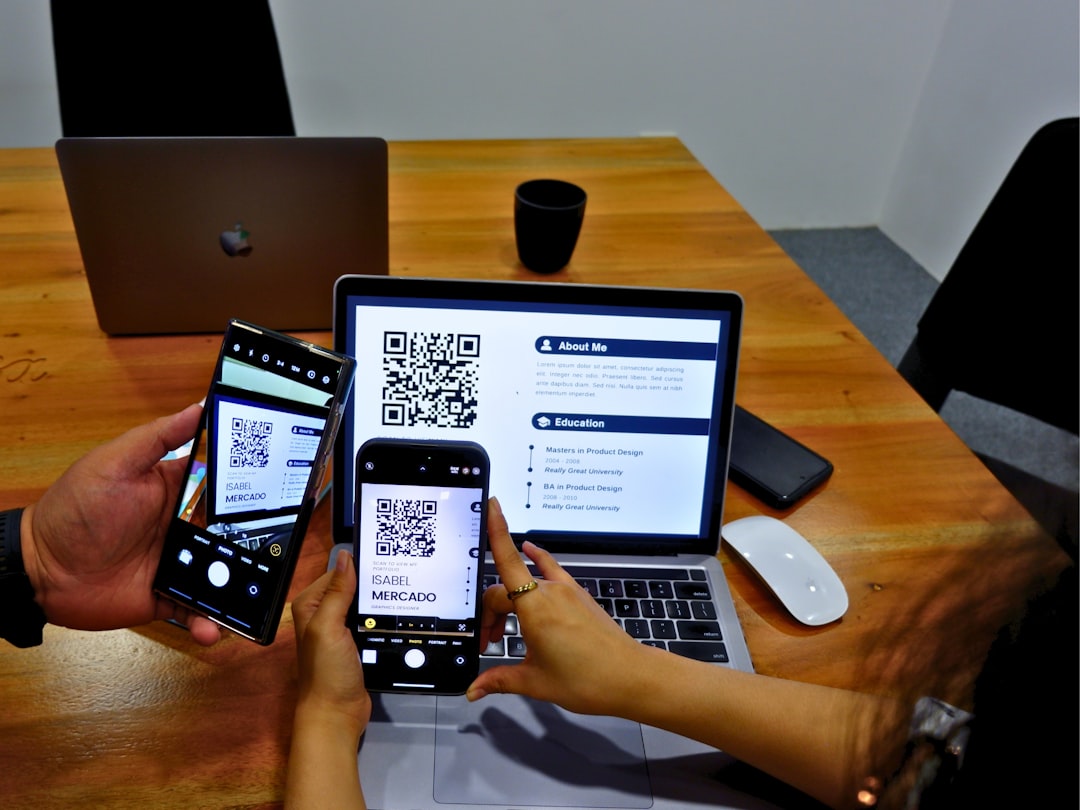
For QR code installation, open your phone’s mobile network settings and select the option to add an eSIM. Scan the QR code provided by the eSIM company. Your phone will download the eSIM profile and ask you to confirm the new mobile plan.
For app based installation, download the provider’s app, log in, and follow the guided setup. Some apps install the eSIM directly without requiring a separate QR code. This can be simpler, especially if you are using only one device.
After installation, label the eSIM clearly. For example, name it Colombia Data. This makes it easier to distinguish from your regular SIM, especially if you keep your home line active for calls and SMS.
Step 5: Activate the eSIM in Colombia
Once you arrive in Colombia, activate the eSIM line and set it as your mobile data source. On most phones, this can be done in the cellular or SIM settings. Make sure data roaming is turned on for the eSIM if the provider requires it. For travel eSIMs, roaming often needs to be enabled because the service may connect through partner networks.
A typical activation process looks like this:
- Open your phone’s Cellular, Mobile Data, or SIM Manager settings.
- Turn on the Colombia eSIM line.
- Set the eSIM as the default line for mobile data.
- Enable data roaming for that eSIM if instructed.
- Wait a few minutes for the phone to register on a local network.
- Open a browser or map app to test the connection.
If the phone does not connect immediately, restart it. You can also toggle airplane mode on and off. In some cases, manually selecting a network in the mobile settings can help, especially in areas where signal strength varies.
Common Activation Problems and How to Fix Them
Most eSIM activations are straightforward, but occasional issues can occur. Fortunately, many are easy to resolve with a few checks.
- No signal: Confirm that you are in Colombia and within network coverage. Restart the phone and make sure the eSIM line is turned on.
- Data not working: Check that the eSIM is selected for mobile data and that data roaming is enabled if required.
- QR code already used: Many eSIM QR codes can be installed only once. Do not delete the eSIM unless the provider advises you to.
- Wrong APN settings: Some providers require a specific APN. If data fails, check the provider’s instructions and enter the APN manually.
- Phone locked: If your device is carrier locked, contact your home carrier. The eSIM provider usually cannot unlock it.
If the problem continues, contact the provider’s support team and provide your order number, device model, location in Colombia, and screenshots of relevant settings. Clear information usually speeds up troubleshooting.
How Much Data Do You Need in Colombia?
Your ideal data allowance depends on how you use your phone. If you mainly use maps, messaging, ride apps, restaurant searches, and occasional browsing, a smaller plan may be enough. If you work remotely, upload files, use video calls, or share your connection with other devices, choose a larger plan.
As a practical guide:
- 1 GB to 3 GB: Short trips, basic messaging, maps, and light browsing.
- 5 GB to 10 GB: One to two weeks of regular travel use, including social media and frequent navigation.
- 15 GB or more: Longer stays, remote work, hotspot use, video calls, and heavier app usage.
To conserve data, download offline maps before travel, disable automatic app updates, limit cloud photo backups, and avoid streaming video on mobile data. These simple habits can significantly extend the life of your plan.
Security and Privacy Considerations
A Colombia eSIM can also improve your digital security. Public Wi Fi in airports, cafés, hotels, and shopping centers may be convenient, but it is not always secure. A private mobile data connection reduces your reliance on unknown networks, especially when accessing banking, work platforms, or sensitive accounts.
For additional protection, use strong passwords, enable two factor authentication, and consider a reputable VPN if you need to access confidential business systems. Keep your main phone number active if you rely on SMS verification, but remember that many services now support authenticator apps, which are often more reliable while traveling.
Should You Keep Your Home SIM Active?
In many cases, yes. One of the advantages of eSIM technology is that you can often use your physical SIM and eSIM at the same time. You can keep your home number available for calls or verification codes while using the Colombia eSIM for mobile data.
However, review your home carrier’s roaming charges before departure. To avoid unexpected costs, turn off data roaming on your home line and make sure the Colombia eSIM is selected as the default data line. If you do not need calls or SMS from your home number, you may choose to disable the home line temporarily.
Final Checklist Before You Go
Before traveling, complete a final check to avoid problems on arrival:
- Confirm that your phone is eSIM compatible.
- Confirm that your phone is unlocked.
- Choose a Colombia eSIM plan with enough data and validity.
- Install the eSIM using stable Wi Fi before departure.
- Save the QR code, order details, and support information offline.
- Know whether your plan activates on installation or upon arrival.
- Set the eSIM as your mobile data line once in Colombia.
- Enable roaming on the eSIM if the provider requires it.
Conclusion
Getting and activating a Colombia eSIM is usually a simple process when you prepare correctly. The essential steps are to confirm device compatibility, buy a suitable plan from a reliable provider, install the eSIM before your trip, and activate it once you arrive in Colombia. With those steps completed, you can enjoy stable mobile data for navigation, communication, bookings, work, and everyday travel needs.
A well chosen eSIM gives you more control than traditional roaming and more convenience than searching for a physical SIM card after landing. For most travelers, it is one of the easiest and most efficient ways to stay connected in Colombia.







