
Getting a website discovered by Google is not a matter of luck; it is a technical and content-driven process. When you add a web address to Google, you are helping Google find, crawl, understand, and eventually index your pages. While Google can discover many sites naturally through links, submitting your website properly gives you more control and helps identify issues before they affect visibility.
TLDR: To add your web address to Google, verify your site in Google Search Console, submit your sitemap, inspect important URLs, and make sure your pages are crawlable and indexable. For example, a small service business that publishes 20 optimized pages and submits a sitemap may see most valid pages discovered within a few days, although ranking can take longer. In many cases, Google reports indexing status, crawl errors, and page performance data directly in Search Console, helping site owners fix problems faster.
Why Adding Your Web Address to Google Matters
Google uses automated software, often called crawlers or bots, to discover pages across the web. These crawlers follow links, read sitemaps, and revisit known websites to detect updates. However, a new website with few or no backlinks may remain undiscovered for longer than expected.
Submitting your site through Google’s official tools does not guarantee top rankings, but it does help Google become aware of your website. More importantly, it gives you access to diagnostic information, such as indexing problems, mobile usability issues, and pages blocked by technical settings.

Step 1: Make Sure Your Website Is Ready
Before asking Google to index your site, make sure the website is worth indexing. A site that contains thin content, broken pages, duplicate text, or unclear navigation may be discovered but still perform poorly in search results.
Check the following before submission:
- Important pages are complete: Your homepage, service pages, product pages, about page, and contact page should be ready.
- Navigation is clear: Users and search engines should be able to move through the site logically.
- Pages load properly: Slow or broken pages can reduce both user trust and crawl efficiency.
- Content is original: Avoid copying text from competitors, manufacturers, or other websites.
- Mobile experience is acceptable: Google primarily evaluates many sites using mobile-first indexing.
A professional, accessible, and well-structured website gives Google clearer signals about what the site is about and why it should be shown to users.
Step 2: Create or Confirm Your Google Search Console Account
The most reliable way to add a web address to Google is through Google Search Console. It is a free platform that allows website owners to monitor search visibility, submit sitemaps, inspect URLs, and detect indexing problems.
To begin, go to Google Search Console and sign in with a Google account. Add your website as a property. Google offers two main property types:
- Domain property: Covers all versions of your domain, including http, https, www, and non-www versions.
- URL prefix property: Covers only the exact version of the web address you enter.
For most site owners, a domain property is the better long-term option because it gives a complete view of the site. However, it usually requires DNS verification, which may involve adding a TXT record where your domain is managed.
Step 3: Verify Ownership of Your Website
Google needs to confirm that you own or manage the website before showing private performance and indexing data. Verification methods may include:
- DNS TXT record: Add a verification record through your domain provider.
- HTML file upload: Upload a specific file to your website’s root directory.
- HTML tag: Add a meta tag to your homepage’s head section.
- Google Analytics: Verify through an existing Analytics account if properly configured.
- Google Tag Manager: Verify through an existing container.
DNS verification is often the most robust method, though it may take some time to propagate. Once verified, Search Console will begin collecting data, although reports may not appear immediately.
Step 4: Submit Your XML Sitemap
An XML sitemap is a file that lists important URLs on your website. It helps Google understand which pages exist and which ones you want crawled. Many content management systems generate sitemaps automatically, often at a location such as example.com/sitemap.xml.
To submit your sitemap:
- Open your verified property in Google Search Console.
- Go to Sitemaps in the left-side menu.
- Enter the sitemap URL, such as sitemap.xml.
- Click Submit.
After submission, Google will show whether the sitemap was fetched successfully. If there are errors, review them carefully. A sitemap should include only valid, indexable URLs that return a proper 200 status code.

Step 5: Use URL Inspection for Important Pages
The URL Inspection tool in Search Console lets you test a specific page and see whether Google knows about it. This is especially useful for new pages, updated content, or critical landing pages.
Paste the full URL into the inspection bar. Google will report whether the page is indexed, whether it is eligible for indexing, and whether any problems exist. If the page is not indexed, you can click Request Indexing. This does not guarantee immediate inclusion, but it can place the URL into Google’s crawl queue.
Use this feature selectively. For example, it makes sense to request indexing for a new homepage, a major product page, or an updated article. It is not necessary to manually submit every minor page if your sitemap and internal linking are strong.
Step 6: Check Robots.txt and Noindex Tags
Sometimes a website is not showing on Google because it accidentally blocks search engines. Two common causes are robots.txt restrictions and noindex tags.
The robots.txt file tells crawlers which areas of a site they may or may not access. A simple mistake can prevent Google from crawling important content. Similarly, a noindex directive tells Google not to include a page in search results.
Review your site for these issues:
- Make sure important pages are not blocked in robots.txt.
- Confirm that live pages do not contain an unintended noindex tag.
- Check that canonical tags point to the correct page.
- Avoid blocking CSS and JavaScript files needed for rendering.
If you are unsure, the URL Inspection tool can often reveal whether Google is allowed to crawl and index a page.
Step 7: Build Internal and External Links
Submitting a web address is only the beginning. Google discovers and understands pages partly through links. Internal links connect pages within your own website, while external links come from other websites.
A new page linked from your homepage, main navigation, or relevant articles is easier for both users and crawlers to find. External links from reputable websites can also help Google discover your site and evaluate its authority.
Focus on natural, relevant links. Avoid paid link schemes, spam directories, and automated link-building tactics. These can damage trust and may violate Google’s spam policies.
Step 8: Monitor Indexing and Performance
After submitting your site, monitor Search Console regularly. The Pages report shows which URLs are indexed and which are excluded. Some exclusions are normal, such as duplicate pages, redirects, or intentionally blocked URLs. Others may require attention.
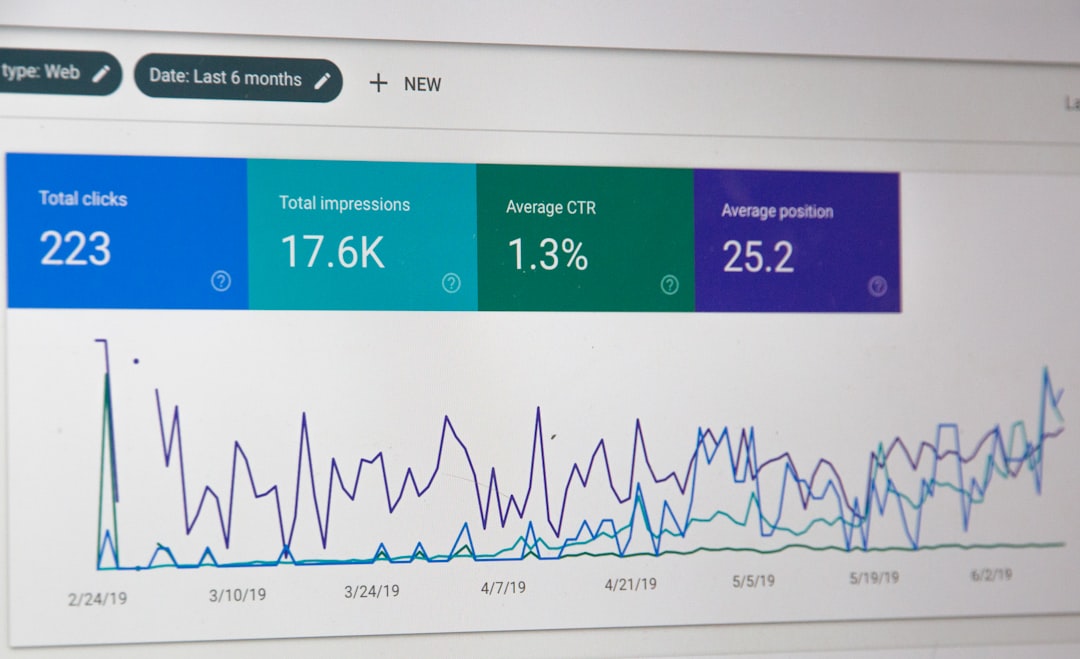
You should also review the Performance report. It shows search queries, impressions, clicks, average position, and click-through rate. For instance, if a newly submitted page receives 1,000 impressions but only 10 clicks, the click-through rate is 1%. That may indicate the page title or meta description should be improved.
How Long Does It Take Google to Find Your Site?
Discovery and indexing times vary. Some pages may be crawled within hours, while others can take days or weeks. Factors include website authority, internal linking, content quality, crawl demand, and technical accessibility.
It is important to distinguish between being indexed and ranking well. A page can be indexed without appearing on the first page of results. Ranking depends on relevance, competition, content quality, user experience, backlinks, and many other signals.
Common Mistakes to Avoid
- Submitting an unfinished website: Low-quality or incomplete pages may create a weak first impression.
- Ignoring Search Console warnings: Errors often point to real technical problems.
- Using only manual URL submission: A sitemap and good site structure are more scalable.
- Blocking Google accidentally: Always check robots.txt, noindex tags, and server settings.
- Expecting instant rankings: Indexing is only one step in search visibility.
Final Thoughts
To add a web address to Google, use a structured process: prepare the site, verify it in Google Search Console, submit a clean sitemap, inspect key URLs, and monitor indexing reports. These steps do not manipulate rankings; they help Google access and understand your website correctly.
A serious search presence is built over time. Once your site is discoverable, continue improving content, technical performance, internal linking, and credibility. Google discovery is the starting point, but consistent quality is what supports long-term visibility.